How hosted files are downloaded, expire and get deleted
A hosted file stays encrypted from the moment it leaves your browser until it reaches your recipient's device. Your recipient's browser downloads it straight from storage, decrypts it locally and writes it to disk. When the link expires, or when you delete the transfer, the stored copy is removed.
This post covers that second half of a transfer's life. For the first half, see how your browser uploads encrypted files straight to storage.
Opening the link: the checks come first
When your recipient opens the link, their browser asks our service for the transfer. The service checks the link before anything is handed out:
- Expiry. An expired link gets the same answer as a link that never existed.
- Password. If you set one in the default mode, our service checks it against a stored hash; the password itself is never stored. Repeated wrong guesses from the same network address are blocked for a while.
- Download limit. Checked each time a file is handed out: once the limit you set is used up, no new download starts.
In the default mode, the file key is unwrapped and handed to the recipient's browser only after the expiry and password checks pass. In Zero-Knowledge mode the key, or the password-wrapped key, is already in the recipient's link and never reaches us. The details are in how Transferify encrypts files in your browser.
The download: straight from storage, decrypted on the device
For each file, our service signs an address that lets the recipient's browser read that one encrypted file directly from storage, and the address never outlives the transfer. The file does not pass through our api, and what storage returns is the encrypted file, exactly as your browser uploaded it.
The recipient's browser then:
- fetches the encrypted file in ranges of 32 MiB, up to four at a time, or 16 MiB and two at a time on touch-first devices such as phones,
- decrypts each chunk as it arrives and checks its authentication tag and position,
- writes the result straight to disk, so a file larger than the device's memory downloads without trouble.
Where the browser supports it, the recipient chooses where to save and the file is written there directly. Otherwise the site's own download handler, running inside the recipient's browser, streams the file into a normal browser download. On a browser where neither is available, files up to 1 GiB are assembled in memory, and larger ones cannot be downloaded there.
If any check fails, the download stops with an error.
"Download all"
Our service does not build ZIP files of encrypted transfers, because decrypting is the recipient's browser's job. So when a recipient downloads a whole transfer, or several files at once, their browser builds the ZIP itself: it downloads and decrypts each file in turn and writes it into one archive as it goes. Files are stored in the archive without compression, which keeps it as fast as the download, and archives larger than 4 GiB are supported.
How downloads are counted
A download is counted when our service hands out a file's download address, which is the moment it actually gives a file to someone. That one moment counts against both the download limit you set on the transfer and your plan's monthly downloads.
- A file fetched in many pieces is still one download.
- "Download all", or several files downloaded together as one ZIP, counts as one download.
- Opening the download page without downloading counts nothing.
- Starting the same file again later is a new download.
Download alerts, on plans that include them, follow the same count, with at most ten alert emails per transfer per day.
Expiry and deletion
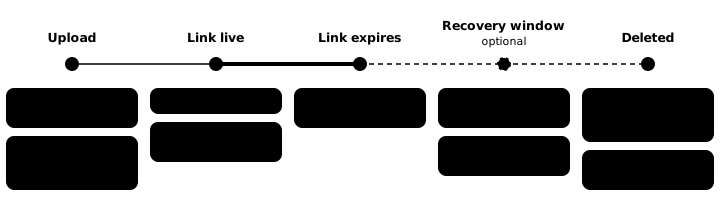
Every hosted file is stored with an instruction that tells storage when to delete it, set from the expiry you chose. Storage's own lifecycle rules then delete the encrypted file once it reaches that age, with no request from us. Those rules count in whole days, so links that expire in less than a day get extra care: our own job checks every two minutes and deletes their files once they have expired. The one-day storage rule stays underneath as a safety net.
- Links that never expire are kept until you delete them.
- Recovery window. On plans that include it, you can choose, when you send, to keep an expired transfer recoverable for a while. Its files then stay in storage for that window, but the link serves no downloads until you recover it, and a transfer can be recovered once.
- Deleting a transfer or a file yourself works on every plan, at any time. The stored files are deleted from storage, and a deletion that fails is retried automatically.
- Links made from stored files. If you made another link from the same stored files, in the Files tab of your transfers, the bytes stay stored for as long as the latest of those links needs them. Each link still stops serving at its own expiry.
- Deleting your account deletes every stored file of the account before the account's own records are removed.
The one exception is a transfer you have placed under a legal hold: it cannot be deleted until you release the hold.
Peer-to-peer transfers have nothing in storage at all, so there is nothing to expire or delete: the file only ever existed on the two devices.
Try it
Send a hosted link with an expiry and a download limit, then open it on another device to watch the browser download and decrypt it. Send a file now.
Frequently asked questions
Is the file decrypted on your servers when someone downloads it?
No. The recipient's browser downloads the encrypted file straight from storage and decrypts it on their device as it arrives. In the default mode our service hands the recipient's browser the file key for that, but it does not decrypt file contents itself.
How are downloads counted against a download limit?
Each file counts once when our service hands the recipient its download address. Fetching that file in many pieces is still one download, and downloading the whole transfer, or several files, as one ZIP counts as one download. Starting a file again later counts again.
When is a hosted file deleted?
After its link expires, storage deletes the encrypted file automatically. Links shorter than a day are cleared by our own job within minutes of expiring. You can also delete a transfer or a single file yourself at any time, on every plan. If another of your links serves the same stored file, its bytes stay until no link needs them.
What happens to my files if I delete my account?
Every stored file of the account is deleted from storage before the account's own records are removed.