How your browser uploads encrypted files straight to storage
When you send a hosted transfer, your browser encrypts each file and uploads it directly to our object storage in the EU. The file does not pass through our api on the way. The api decides whether an upload may start, signs a short-lived address for each piece, and checks the result before the link goes live. Your browser does the heavy work.
This post walks through that path, from the moment you drop a file to the moment the link works.
Why upload straight to storage
The usual way to build an upload is to send the file to an application server, which then writes it to storage. Every byte then crosses two networks, and the application server becomes the bottleneck for every large file at once.
Transferify skips that step. Our storage speaks the S3 protocol, which lets a service hand out signed addresses: a web address that allows one specific action, such as uploading one particular part of one file, until it expires. Your browser sends each encrypted part straight to such an address. The api never handles the file's bytes, only the small requests that set the upload up and finish it.
Storage is in the EU. New files go to Cloudflare R2, restricted to its EU jurisdiction. Files stored before that change stay on AWS S3 in Frankfurt.
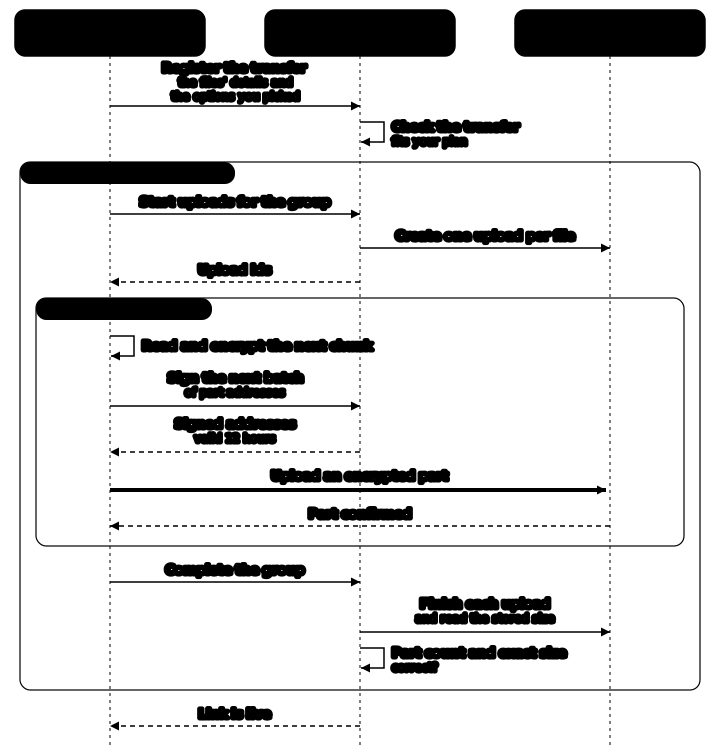
Step 1: the transfer is registered
Before anything is uploaded, your browser tells our service what it is about to send: the files' details and the options you picked. The service checks that the transfer fits your plan, for example the upload size your plan allows, and creates the transfer.
Step 2: files move in groups
Files then move in groups of up to 100. For each group, one request asks our service to start a storage upload for every file in it, and the plan check runs again. Later, one request completes the whole group.
Grouping keeps the number of requests small. A transfer of 10,000 files needs about 300 requests to our service, where one request per file per step would need about 30,000.
Step 3: the file is encrypted and cut into parts
Your browser reads the file as a stream and encrypts it with AES-256-GCM in chunks: 8 MiB for most files, and a larger multiple of 8 MiB for very large ones. Storage accepts at most 10,000 parts per file, and a file has exactly as many parts as it has encrypted chunks, so the chunk size grows with the file to stay within that limit. How the encryption itself works, and where the key goes, is explained in how Transferify encrypts files in your browser.
The parts are equal-length slices of the encrypted stream rather than the chunks themselves, because storage requires every part except the last to have exactly the same length.
Step 4: each part gets its own signed address
For every part, our service signs an address that allows uploading that one part, valid for 12 hours. Your browser asks for addresses in batches, a little ahead of the parts that will use them, so an address is used long before it expires. When a part has to be sent again, it gets a newly signed address.
Step 5: many parts in flight, within a memory budget
A single connection to storage rarely fills a fast line. So your browser keeps several parts in flight at once, and while one part is on the wire, the next one is already being encrypted.
How many parts run in parallel is decided on your device, in two steps:
- A memory budget. Encrypted parts have to be held in memory until storage confirms them. The browser sets a budget for your type of device, much smaller on phones, and never keeps more parts in flight than fit in it.
- Measured, not guessed. The browser starts from the width the budget allows, normally four parts, and tries adding parallel uploads while the measured speed keeps improving, up to 16 at once. It never drops below its starting width, so the search cannot make an upload slower than it would have been.
The file is read from disk only as fast as parts leave, so a file much larger than your device's memory uploads without trouble.
Step 6: storage confirms, our service checks
When every part of a group's files is in storage, your browser asks our service to complete them. Before a file is accepted, the service checks that:
- the number of parts matches the number of encrypted chunks the file must have,
- the stored size matches, to the byte, what an encrypted file of the announced size must be.
If the stored size is wrong, the stored copy is deleted and the file is not accepted. Once every file of the transfer is complete, the share link goes live.
When something goes wrong
- A part fails. It is tried again with a newly signed address. Lost connections are waited out, and an upload interrupted by a reload can be continued later in the same browser. The details are in how a large encrypted upload survives a dropped connection.
- Storage refuses to complete a file. That file is uploaded again, up to three times in all, before the upload gives up.
- You cancel. The uploads still open in storage are cancelled, and the transfer is discarded. Anything storage still holds from an unfinished upload is cleared automatically seven days after that upload started.
Try it
Drop a large file into Transferify, choose a hosted link, and watch the progress: what you see is your own browser encrypting and uploading in parallel. Send a file now.
Frequently asked questions
Does my file pass through Transferify's api on the way to storage?
No. Your browser sends the encrypted file directly to our object storage in the EU. Our api registers the transfer, signs a short-lived address for each part, and checks the result at the end, but the file's bytes do not pass through it.
Why is my file split into parts?
Parts let a large file go up over several connections at once, and let one failed part be sent again without restarting the whole file. Each part is a slice of the already encrypted file.
Does uploading a large file need a lot of memory?
No. Your browser reads and encrypts the file a piece at a time and holds only the parts that are in flight. How many parts it keeps in flight is limited by a memory budget for your type of device.
What stops a broken or incomplete upload from becoming a download link?
When a file finishes, our service checks that storage holds exactly the number of parts and the exact encrypted size the file must have. If the stored size is wrong, the stored copy is deleted and the file is not accepted.