How Transferify converts a file in a container of its own
People often need a file in another format before they send it: a HEIC photo as a JPG, a MOV as an MP4, a DOCX as a PDF. Transferify now does that step for you, on the convert page and as a mode of the composer, from which you send the converted files on.
The converter is Transmute, an open-source program that we run ourselves. We did not write it, and we cannot trust the files people give it. This post explains how we run it so that each conversion sees its own file and nothing else, and what converting changes: while a file is converted, it is readable on our servers.
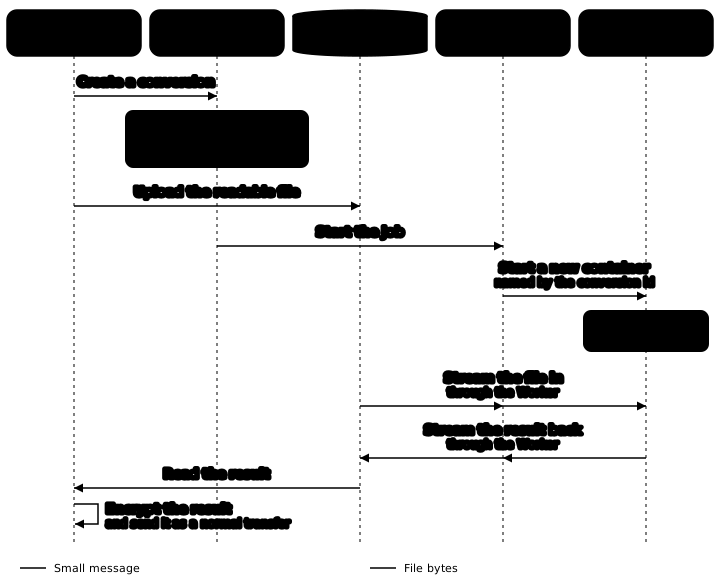
Transmute, run by us
We run Transmute's published image, version 2.1.1, pinned by digest. Transmute is young, so the pin moves only on purpose, and an end-to-end test against the real image runs on our development environment after each move.
Three settings matter more than the rest:
- Transmute is never reachable from the internet.
- Its
ALLOW_UNAUTHENTICATEDsetting staysfalse. - Nothing calls Transmute's endpoint that downloads a file from a URL. The only file a job sees is the one uploaded for it.
One container per conversion
Each conversion runs in its own Cloudflare Container. A Worker starts it through a Durable Object and names it by the conversion's id. The container is billed only while it runs, and it stops when the job ends.
A container for each job removes everything that jobs would otherwise share. There is no shared converter, no shared disk and no queue in front of one machine, and one account's file never sits beside another's. The container's disk ends with the container, so nothing a job wrote to that disk outlives it.
The containers run in the Cloudflare account that holds our files bucket, because the files are already there. The files buckets are in R2's eu jurisdiction, and the containers have the placement constraint jurisdiction = "eu", so the readable file stays in Europe while it is converted.
Only the Worker can reach the container
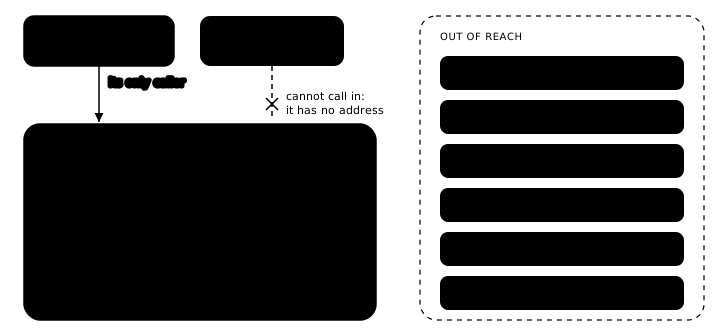
A Cloudflare Container has no address of its own. The only way to it is through the Worker that started it.
That makes one Transmute behaviour harmless. After a start, Transmute gives the admin account to its first caller. On a converter with an address, whoever called first after a restart would own it. Here every job starts a fresh container, and the Worker is its first and only caller. On each start the Worker creates Transmute's service user and asks it for a token, using secrets that our Terraform sets.
The Worker itself has a public hostname, as every Worker route does. Our api calls it over HTTPS with a service token, for four things only: create a job, read its status, cancel it and delete it. These are small JSON messages; the api never sees a file's bytes. A rate limiting rule on the Worker's route is the second guard.
Our api decides before a byte moves
The browser and our api talk about a conversion over Connect RPC. When the browser creates a conversion, the api checks four things against your plan: the kind of file, its size, the month's count and the format pair. A conversion over your plan's count or size is refused with a reason such as FILE_CONVERSION_LIMIT_REACHED, and the site shows the plans that would allow it. Nothing has been uploaded at that point, and a file that cannot be converted can still be sent as it is.
The Worker and the container enforce nothing about plans, counts or sizes. They run what the api allowed. The rules live where the plan and the count already are, so one place checks them and one place changes them.
- The kind of a file is the family of its source format: video, audio, image or document. An MP4 converted to an MP3 is a video conversion, because the source is decoded as video.
- The count reserves a conversion when it starts and counts it when it succeeds; a failed or cancelled one does not count. A new conversion is checked against the finished ones plus the ones still running, so two open tabs cannot both take the month's last one.
- The load is capped too: the api limits how many jobs run at a time, per account and in total, and the rest wait.
The list of formats also comes from Transmute, never from a list we keep. Transmute reports its inputs and outputs as two sets, not as pairs, and it decides a file's type from its extension, so our api uploads a tiny file of each input extension once and caches the targets Transmute offers for it. The final word is still Transmute's answer for your real file; a pick it refuses fails with a clear message and does not count.
The file takes a different road
File bytes never go through RPC, because the gateway in front of our api caps a message at 1 MiB. The browser uploads the original with presigned multipart URLs, using the same storage code as a hosted transfer upload, to a staging key in our files bucket: 1-days/file-conversions/<account>/<conversion id>/source. R2 encrypts it at rest.
The Worker streams the source from its R2 binding into Transmute, then streams the converted file back into the bucket. The bytes never pass through our api, and the container itself holds no storage credentials.
When each copy is deleted
| What | When it is deleted |
|---|---|
| The original, in staging | By our api, when the job ends |
| The converted file, in staging | By our api, 24 hours after it was made |
| An upload the browser never finished | Aborted by our api within 24 hours |
| Anything on the container's disk | With the container, when the job ends |
| Anything left under the staging prefix | By the bucket's one-day rule, as a second line |
The api's own deletes are what keep the promise that a converted file is gone after 24 hours. The bucket's rule is there in case one of them does not happen. Without the api's abort, the bucket alone would keep the parts of an unfinished upload for 7 days.
Why the converted file is still encrypted in your browser
Today every hosted file is encrypted in your browser with AES-256-GCM before any of its bytes are sent, with a key made on your device, as explained in how Transferify encrypts files in your browser. Our service does not decrypt file contents.
A converter cannot work on an encrypted file, so the question was where the converted file becomes an encrypted transfer. There were two ways.
Through the browser, which is what we built. The browser uploads the readable original, the container converts it, and the browser reads the result back from storage in ranges and feeds it straight into the existing encrypted upload, so nothing is stored in the browser. The converted file is then sent like any other file, so transfers work exactly as before. The cost is traffic: a large file travels three times, up, down and up again.
On the server, which we left out of this version. Our api would encrypt the converted file itself and place it in the transfer, which saves one trip. But the api would then hold a file's key and its readable content at the same moment, which it never does today. It would also need a second copy of the browser's encryption code, in Java.
The trade-off, plainly
To convert a file, we have to be able to read it. Until the job ends, the original is readable on our servers: in the staging area, where storage encrypts it at rest, and inside the container that converts it. The converted file stays in staging for up to 24 hours, so you can download it or send it, and is then deleted. This holds however you send the file afterwards: a file you convert and then send peer-to-peer still went through our converter first.
It is also why a converted file is never sent as Zero-Knowledge. In Zero-Knowledge mode we never receive the key and never hold anything we can read, and a converted file was readable on our servers. While a converted file is in the list, the Zero-Knowledge option is off, and it comes back when the file is removed.
If a file attacks the converter
Converters such as LibreOffice and ffmpeg are a known target for crafted files, so we plan for a file that breaks out inside the converter.
Such a file sees only its own job: its own container, its own source file and the Worker that started it. It could not reach another account's file, our database, our api, any key or any stored transfer. The container starts with its internet access switched off and holds no storage token, so it has no way out and nothing to reach. The container is new for this job and ends with it, so no earlier job's file is on its disk and no later job will run in it. It has no address, so nothing on the internet can call it.
Video runs on the CPU
Transmute re-encodes video with libx264, on the CPU. It has no GPU path, and Cloudflare Containers offer no GPU type. So video is the slow case, and because a container is billed for the time it runs, a slow job is also an expensive one.
Each video job can run for up to two hours. Transmute cannot stop a running job, but the Worker can end the container. A job that passes the limit is ended, reported as too long, not counted against your plan, and not started again. Our api starts a job only when its kind and size fit within the time limit at the conversion rates we measured.
Here is what those rates look like on our dev environment, with generated test files. A 3 MB photo, a 10-page PDF turned into images and a 50 MB WAV turned into MP3 each took about half a minute, and a 1 MB Word document took 48 seconds to become a PDF. About 12 to 15 seconds of every job is the container starting, so for a small file the start is most of the wait. Video is where the time goes: 1080p video at about 17 Mbit/s took 2 minutes 43 seconds for 100 MB, 23 minutes for 1 GB and 91 minutes for 4 GB.
Cloudflare does not promise that a container runs for a set time either. If a container stops early, the job fails with that reason, it is not counted, and you convert again.
Try it
Convert a file on the convert page, then send it. Your browser encrypts the converted file like any other transfer.
Frequently asked questions
Is my file readable on your servers while it is converted?
Yes. A converter needs the readable file. The original goes to a staging area in our EU storage, which encrypts it at rest, and our api deletes it when the conversion ends. The converted file is kept there for 24 hours so you can download it or send it, and is then deleted. When you send it, your browser encrypts it like any other file.
Can I convert a file in a Zero-Knowledge transfer?
You can convert it, but a converted file is never sent as Zero-Knowledge. In Zero-Knowledge mode we never receive the key, so we never hold anything we can read, and a converted file was readable on our servers. While a converted file is in the list, the Zero-Knowledge option is off.
Can my file end up next to someone else's?
No. Each conversion runs in its own container, named by the conversion's id, started for that job and ended when the job ends. There is no shared converter and no shared disk.
Does the converter decide what my plan allows?
No. Our api checks the kind of file, its size, the month's count and the format pair before your browser uploads anything. The Worker and the container only run what the api allowed.
Why does a long video fail instead of finishing late?
Video is re-encoded on the CPU, and each video job can run for up to two hours. Transmute cannot stop a running job, so the Worker that started the container ends it. The conversion is reported as too long, does not count against your plan, and is not started again.